
Colour swatches
Show colour circles instead of text. Set them once, or let BundleBoss fill them in from the colour name.
What swatches are
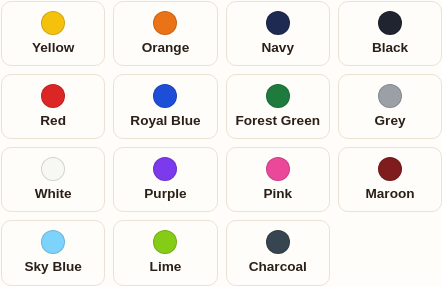
A swatch is a small coloured circle shown in place of a text button for a colour option. It is a BundleBoss feature: WooCommerce has no built-in colour swatch, so the colour is stored against the attribute and rendered on the bundle’s product page, with the colour name in a hover tooltip.
Set a swatch colour
For a global attribute (one you manage under Products, Attributes):
- Go to Products → Attributes, find your Colour attribute and click Configure terms.
- Edit a term (say "Red") and pick a Swatch colour with the colour picker.
- Save. That colour now shows as a circle everywhere the attribute appears in a bundle.
A swatch column in the terms list shows which colours are set.
Filled in from the name
If a colour has no swatch set, BundleBoss works it out from the name. It knows around ninety-five common colours and falls back to the base word for compounds, so “Royal Blue” and “Heather Grey” still resolve. This runs in both the configurator and the quantity grid.
This matters most for custom attributes (ones typed straight onto a single product, the kind imported catalogues often use). They have no shared colour setting to attach a swatch to, so the name is the only source, and it means those products show real colour dots with no setup at all. A name BundleBoss cannot recognise falls back to a tidy text chip rather than a blank circle.
You only need to set swatch colours by hand for shades the name cannot describe, like a specific brand colour. Everyday colours fill themselves in.
Mixing swatches and text
You do not have to swatch everything. Colour can show as circles while Size stays as text buttons in the same bundle. Any attribute term without a colour (and any name that cannot be resolved) simply renders as text, so nothing ever looks broken.
These swatches are the colour options a customer picks. To recolour the configurator’s own buttons and bars to match your brand, see Colours & branding.
Still stuck? Email a human. The person who reads it is the person who builds the plugin.