
Compatibility & quantity rules
Rules keep every build valid: only offer the parts that fit what the customer already chose.
Rules work on [choice slots](/docs/choice-slots/) and are part of the Builder.
What rules do
A rule makes one slot’s choice control what another slot may offer, using the tags, categories or attributes already on your products. Nothing new to model: tag your products once and the rules maintain themselves, so a new product with the right tags obeys existing rules automatically.
Rules read like a sentence:
If [Processor] has [Tag: amd] then [Motherboard] must have [Tag: amd]
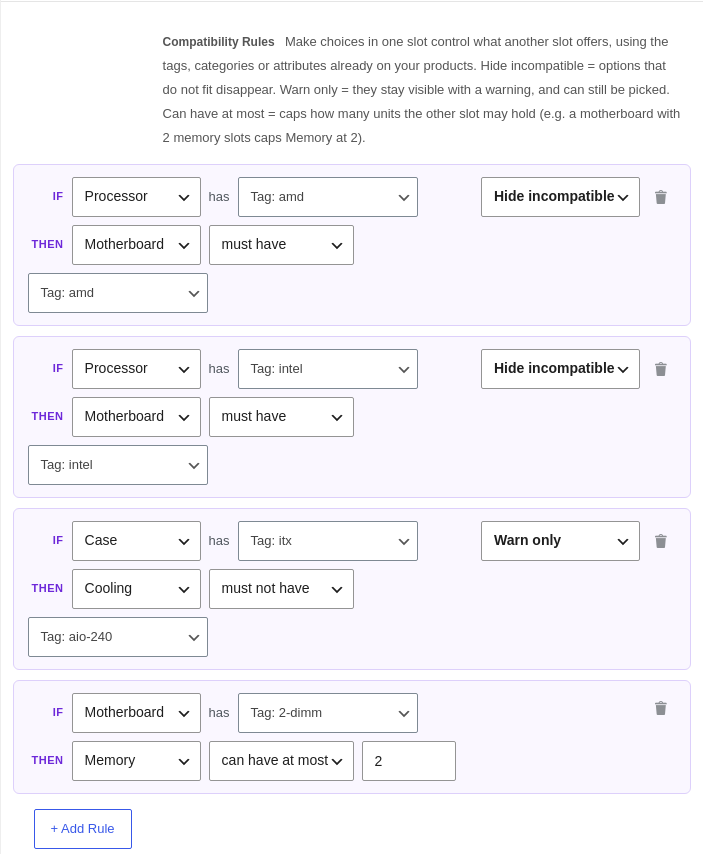
Compatibility rules
Each rule sets what the target slot’s options need:
- must have / must not have a given tag, category or attribute value.
- Hide incompatible: options that do not fit disappear, and are blocked on the server too.
- Warn only: they stay selectable but carry a warning badge.
When the customer changes the controlling choice, the affected slots refresh, and a chosen product that no longer fits is cleared with a short explanation.
Quantity rules
The same rule cards can cap a quantity instead of filtering options:
If [Motherboard] has [Tag: 2-dimm] then [Memory] can have at most [2]
Quantity rules are always enforced (there is no warn mode for a physical limit), they only ever tighten, and a slot’s own Min always wins, so a misconfigured rule can never make a bundle unbuyable. On the storefront the stepper clamps live with a note like “Limited to 2 by your Motherboard choice”, and lifts again if the controlling choice changes.
Setting rules up
- Tag your products so the relationships exist (for example tag processors and boards
amdorintel). - Save the bundle so its choice slots exist to connect.
- Add a rule per relationship: a Hide rule each way for platform fit, a quantity rule for a physical cap.
Server enforcement is the authority. Whatever a customer's browser does, an add-to-cart that breaks a rule is refused, so an invalid build can never reach checkout.
A worked example: PC builder
- One choice slot per component: Processor, Motherboard, Memory, and so on.
- Tag by platform, then two Hide rules: if Processor has amd, Motherboard must have amd, and the same for intel.
- A physical cap as a quantity rule: if Motherboard has 2-dimm, Memory can have at most 2.
The seeded Custom PC Builder demo is set up exactly this way, including a warn-mode example, so you can copy it.
Still stuck? Email a human. The person who reads it is the person who builds the plugin.